best way to register a domain name


Registering a domain name is one of the first steps you’ll take when launching a website or business online. Your domain is the address people will use to find you, so choosing the right one requires careful planning. It should be simple to remember, easy to type, and relevant to your brand or purpose. Avoid overly complex names or those with unnecessary numbers or hyphens, as they can confuse visitors and hurt your credibility.
Beyond the name itself, you’ll need to consider the registrar you use. Some registrars offer additional services like email hosting or SSL certificates, which can simplify your setup. Pricing varies, but most basic domain registrations start at around ten dollars per year. If you’re planning to keep the domain long-term, it’s worth investing in a few extra years upfront to avoid the hassle of re-registering later.
I’ve assembled a list below of the best options for registering a domain name.
📋 Table of Contents
- 1. Understanding Domain Name Basics
- 2. Choosing the Right Domain Extension
- 3. Researching Domain Availability
- 4. Using Domain Registrar Services
- 5. Domain Privacy Protection
- 6. Domain Name Registration Process
- 7. Domain Name Security Measures
- 8. Domain Name Renewal and Expiration
- 9. Transferring a Domain Between Registrars
1. Understanding Domain Name Basics
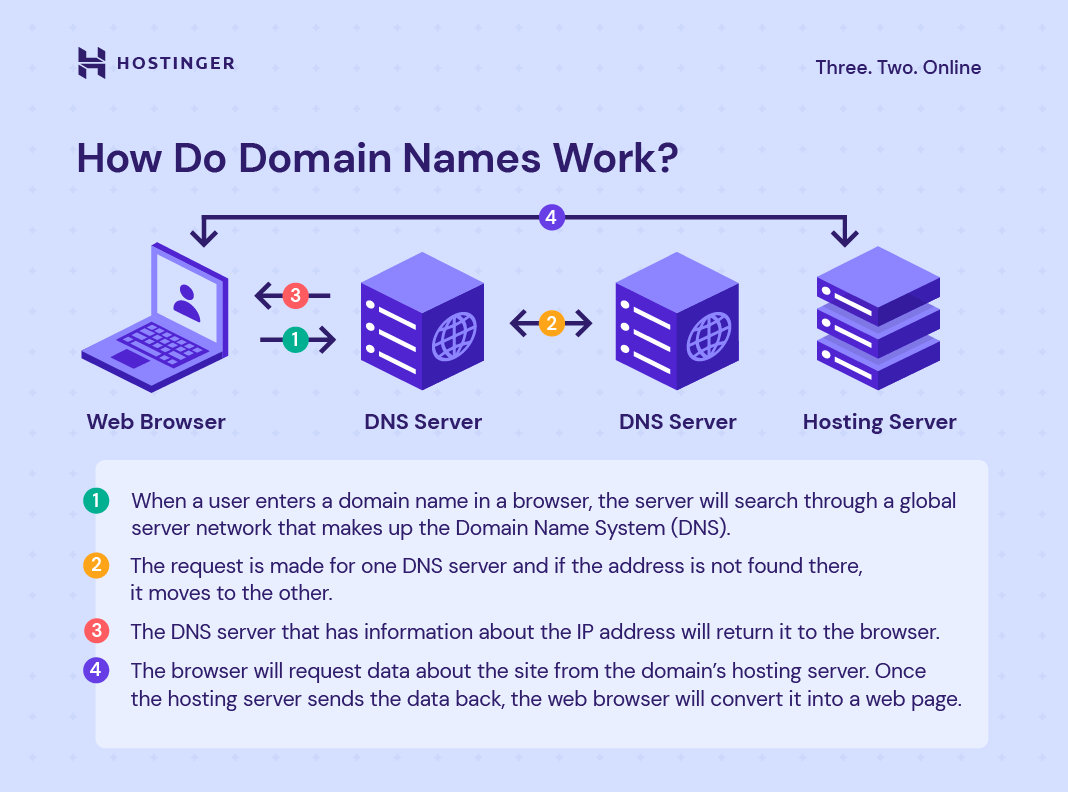
Before diving into registration, it’s essential to grasp what a domain name is and why it matters. A domain name is the human-readable address of your website, like ‘example.com’ instead of the technical IP address. It’s how people find and remember your site, acting as your online identity. Choosing the right domain sets the foundation for your brand’s credibility and accessibility. Whether you’re launching a business, a personal blog, or an e-commerce store, a well-chosen domain name can influence visitor trust and long-term success.
- Essential Online Identity: Serves as your website’s unique address, ensuring visitors can locate you easily.
- Brand Recognition: A memorable domain name helps build brand awareness and recognition over time.
- Search Engine Optimization (SEO): A relevant domain name can improve search rankings by aligning with your content and target audience.
2. Choosing the Right Domain Extension
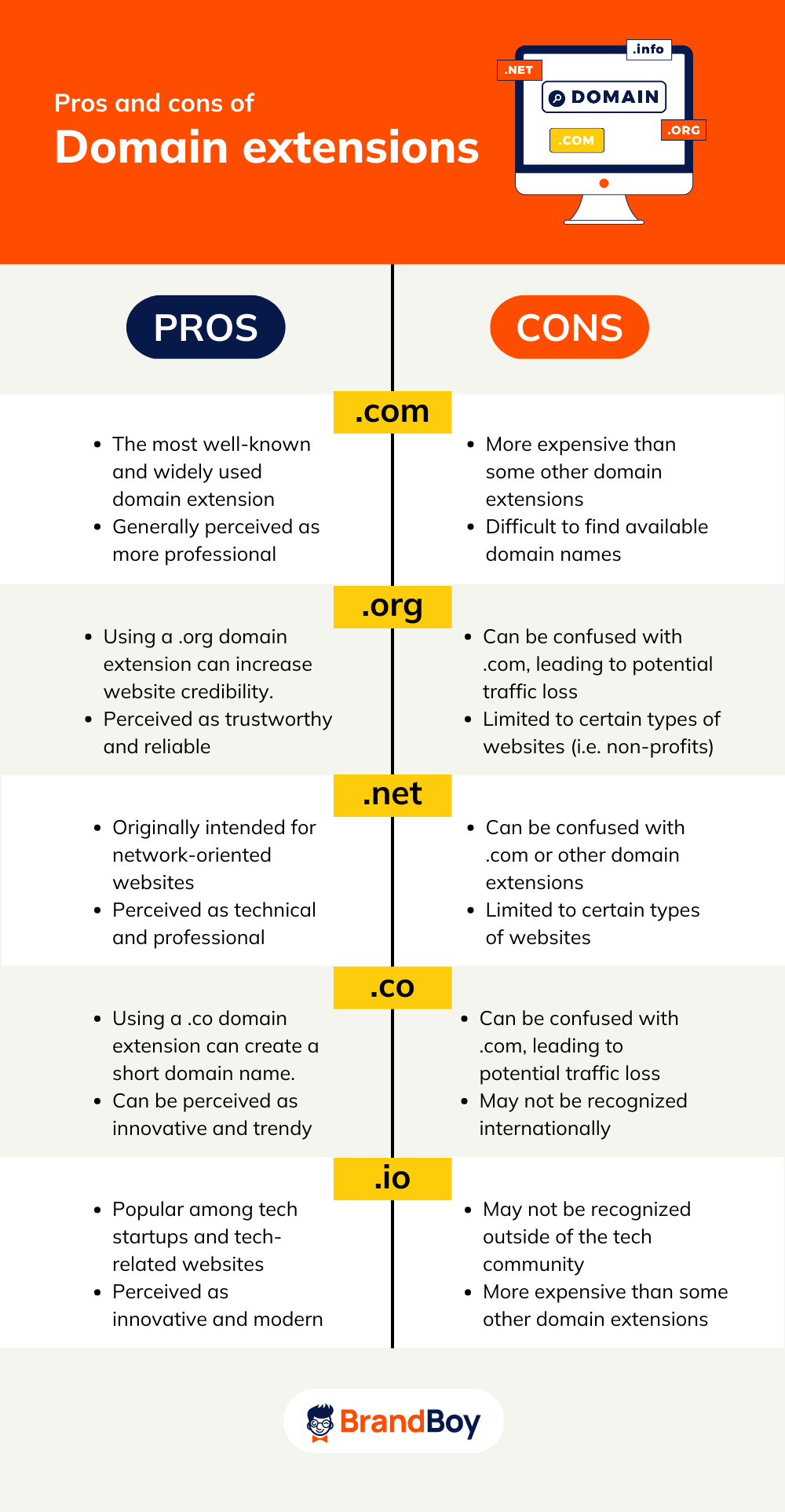
The extension (or top-level domain, TLD) at the end of your domain name—like .com, .net, or .io—plays a critical role in perception and usability. While .com remains the most trusted and widely recognized, newer extensions like .tech, .shop, or .blog cater to specific industries or purposes. Consider your audience and goals: a .com domain feels professional, while a .io or .app might appeal to tech-savvy users. Avoid overly generic or confusing extensions that could mislead visitors.
- .com as the Gold Standard: Most trusted and widely recognized globally, enhancing credibility.
- Industry-Specific Extensions: Options like .tech, .shop, or .blog align with niche audiences.
- Global Reach: Extensions like .co.uk or .de support localized audiences.
- Future-Proofing: Avoid overly obscure TLDs that may lose relevance over time.
3. Researching Domain Availability
Before committing to a domain, thoroughly research its availability to avoid costly mistakes. Use domain search tools provided by registrars like Namecheap, GoDaddy, or Google Domains to check if the name is taken. Look beyond the exact match—consider variations (e.g., adding numbers, hyphens, or misspellings) to see if alternatives exist. Avoid domains with negative connotations or legal issues, as they could cause reputational harm. Prioritize names that are easy to spell, pronounce, and remember, as these improve user experience and retention.
- Exact Match Search: Check if the precise name is available for immediate registration.
- Variation Testing: Test common alternatives (e.g., misspellings, abbreviations).
- Legal & Brand Safety: Avoid domains with trademark conflicts or offensive language.
- User-Friendliness: Ensure the name is short, memorable, and easy to spell.
4. Using Domain Registrar Services

A domain registrar is the company that holds and manages your domain name. Popular registrars like GoDaddy, Namecheap, and Google Domains offer user-friendly interfaces, pricing transparency, and additional services like privacy protection and SSL certificates. Compare features such as free domain transfers, money-back guarantees, and customer support before choosing. Some registrars bundle domain registration with hosting, which can simplify your setup but may limit flexibility. Opt for a registrar with a strong reputation for reliability and security to ensure smooth operations.
- User-Friendly Platforms: Intuitive interfaces for easy domain management.
- Additional Services: SSL certificates, privacy protection, and hosting bundles.
- Pricing Transparency: Clear pricing with no hidden fees.
- Customer Support: Reliable support for troubleshooting and assistance.
- Domain Transfer Options: Flexibility to switch registrars if needed.
5. Domain Privacy Protection
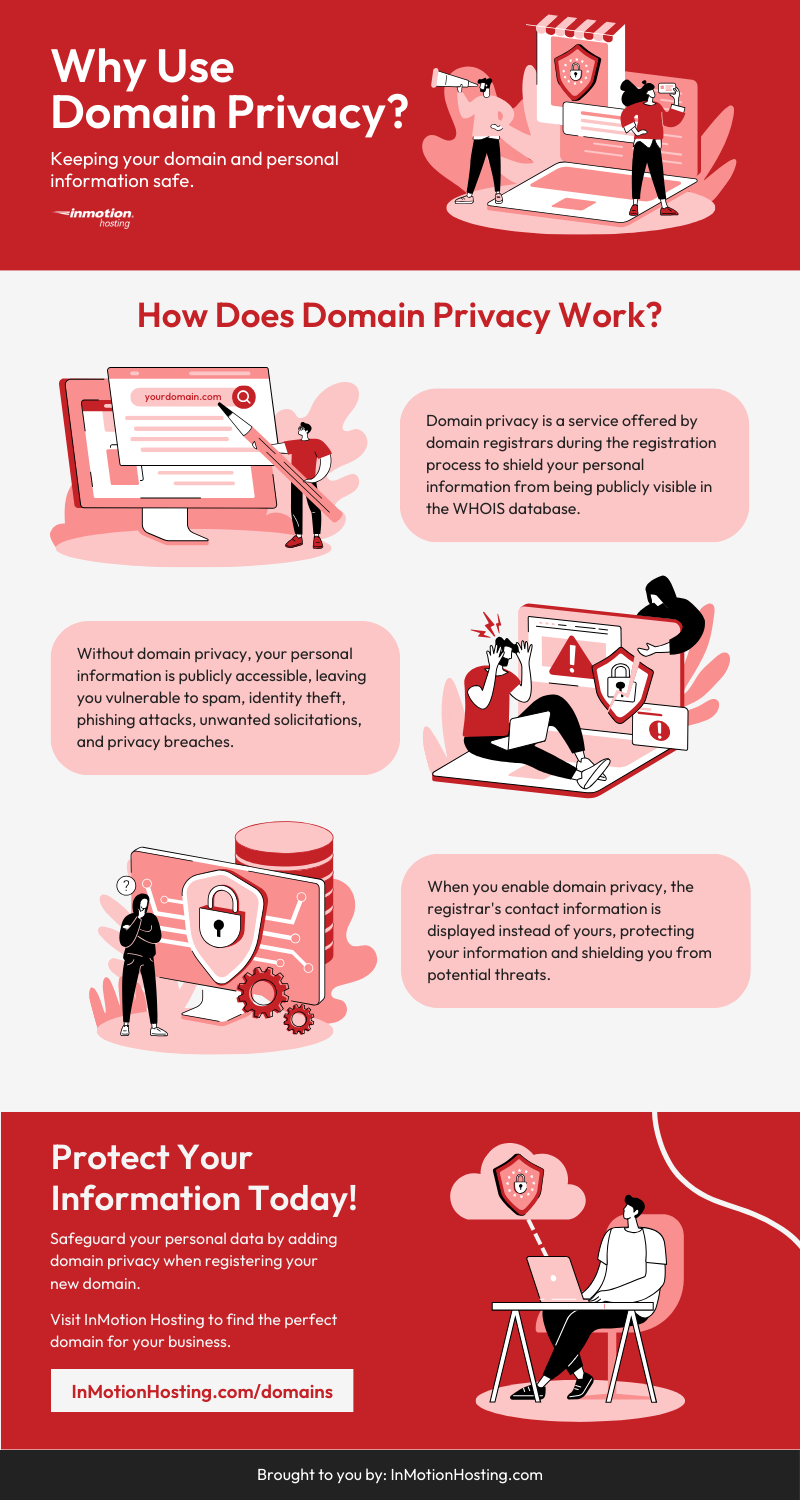
Your personal information—such as your name, address, and phone number—can be publicly listed in WHOIS databases, which some users may find privacy-invasive. Domain privacy protection services shield this data by redirecting queries to a third-party contact, ensuring your details remain confidential. This is especially important for small business owners, freelancers, or individuals concerned about spam or harassment. Most registrars offer this service for an additional fee, typically around $10–$15 per year. It’s a simple yet effective way to protect your identity online.
- WHOIS Privacy Shield: Hides your personal contact details from public view.
- Automatic Updates: Ensures your information stays current without manual changes.
- Spam Prevention: Reduces unwanted emails and inquiries.
- Cost-Effective: Adds minimal expense to your domain registration.
- Global Compliance: Meets data protection regulations in many regions.
6. Domain Name Registration Process

Registering a domain is straightforward once you’ve chosen the right name and registrar. Start by entering the domain name into your registrar’s search bar, then select the extension and payment method. Most registrars offer one-click checkout, allowing you to pay annually or monthly. Review the terms and conditions carefully, including any renewal fees or hidden charges. Once registered, you’ll receive confirmation details and access to manage your domain through your registrar’s dashboard. This process typically takes a few minutes, though some domains may require manual verification.
- One-Click Registration: Fast and convenient checkout process.
- Payment Options: Supports annual or monthly payments.
- Automatic Renewal: Prevents domain expiration with auto-renewal.
- Immediate Access: Full control over your domain within minutes.
- Verification Steps: May require manual confirmation for certain domains.
7. Domain Name Security Measures
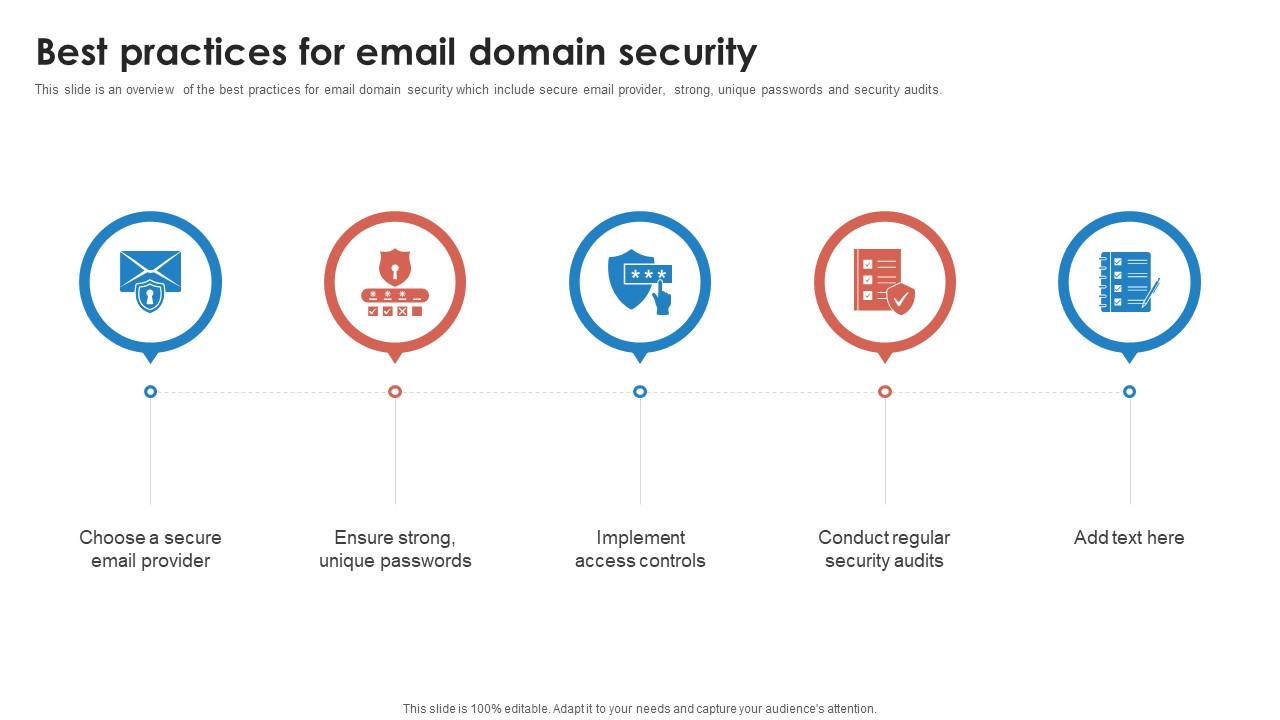
Securing your domain is critical to protecting your online presence from cyber threats. Enable SSL certificates to encrypt data transmitted between your site and visitors, which is essential for trust and SEO. Set up domain lock features to prevent unauthorized transfers, which can disrupt your business. Regularly update your domain settings and monitor for suspicious activity. Tools like DNSSEC can further enhance security by preventing spoofing attacks. Small businesses and individuals should prioritize these measures to safeguard their digital assets and reputation.
- SSL/TLS Encryption: Secures data transmission and boosts trust signals.
- Domain Lock: Prevents unauthorized transfers of your domain.
- DNSSEC Implementation: Protects against DNS spoofing attacks.
- Regular Monitoring: Detects and mitigates security threats early.
- Password Protection: Ensures only authorized users manage your domain.
8. Domain Name Renewal and Expiration
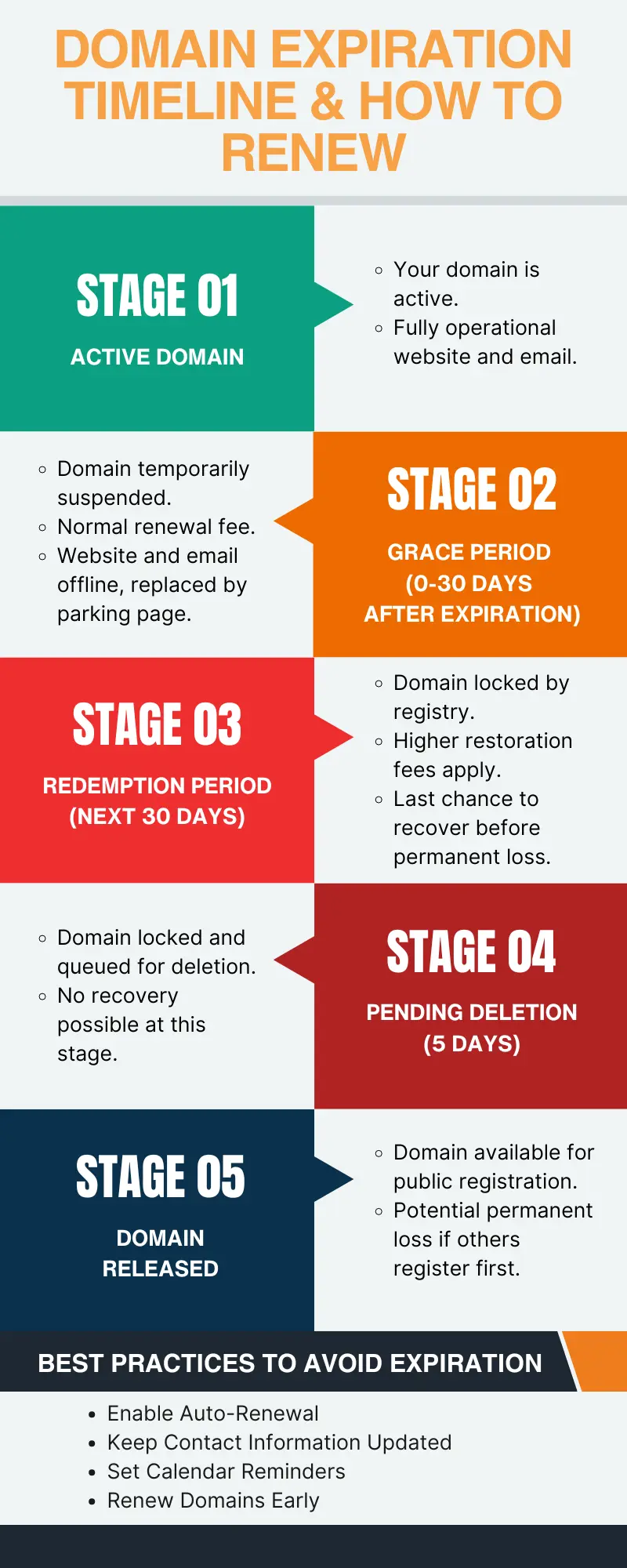
Domain expiration is a common concern, but most registrars offer auto-renewal to prevent accidental loss. Set up reminders or alerts 30–60 days before renewal to avoid lapses. If your domain expires, it may enter a grace period (usually 5–10 days) where you can still renew it at full cost. After the grace period, the domain may be auctioned off or deleted, leaving you without a web address. To avoid these risks, always renew your domain before it expires and keep track of renewal dates in your registrar’s dashboard.
- Auto-Renewal: Automatically renews your domain before expiration.
- Grace Period: Allows temporary renewal after expiration.
- Renewal Alerts: Receives notifications to avoid missed renewals.
- Domain Auctions: Risk of losing domain if not renewed promptly.
- Cost Management: Prevents unexpected fees from missed renewals.
9. Transferring a Domain Between Registrars

Transferring a domain allows you to switch registrars for better pricing, features, or support. The process requires the authorization code (EPP code) from your current registrar and the authorization code from your new registrar. Both registrars must agree to the transfer, and the process typically takes 5–7 business days. Ensure you have your domain’s current details (name servers, DNS settings) ready before initiating the transfer. If you’re unsure, consult your current registrar’s support team to avoid delays or errors. Transferring can be cost-effective if you find a better deal, but always verify the new registrar’s reputation and terms before proceeding.
- Authorization Code: Required from both current and new registrar.
- Transfer Window: Usually 5–7 business days to complete.
- DNS Verification: Ensure name servers and settings are correct.
- Cost Savings: May reduce annual fees with better pricing.
- Support Assistance: Current registrar can guide you through the process.
Frequently Asked Questions
How long does it take to register a domain?
Domain registration typically completes within minutes to a few hours, depending on the registrar and domain availability. Some domains may require manual verification, which can take up to 24–48 hours. Always check the registrar’s processing times for your specific domain.
Can I register a domain name that’s already in use?
No, you cannot register a domain name that’s already taken. Use domain search tools to check availability, and consider variations or alternative extensions if the exact name isn’t available.
What happens if my domain expires?
If your domain expires, it enters a grace period (usually 5–10 days) where you can renew it at full cost. After the grace period, the domain may be auctioned off or deleted. Set up auto-renewal alerts to avoid losing your domain.
Do I need a business to register a domain?
No, you can register a domain for personal use, a blog, or a small business. Domain registration is open to individuals and organizations, regardless of legal status.
How do I protect my domain from cyber threats?
Enable SSL certificates, use domain locks, and regularly monitor your domain settings. Tools like DNSSEC can also enhance security by preventing spoofing attacks. Keep your registrar and domain settings updated to reduce vulnerabilities.
Can I transfer my domain to another registrar?
Yes, you can transfer your domain to another registrar if both registrars agree. You’ll need the authorization code from your current registrar and the new one. The process typically takes 5–7 business days, so plan accordingly.
What should I look for when choosing a registrar?
Look for a registrar with a user-friendly interface, transparent pricing, strong customer support, and additional services like privacy protection and SSL certificates. Compare features and reviews to ensure reliability and security.