
best way to purchase a domain name


Purchasing a domain name is one of the first steps toward building a professional online presence, whether for a business, personal brand, or side project. The right domain can make your website easier to remember, boost credibility, and set you apart from competitors. But not all domains are created equal, and the process of buying one requires careful planning. You’ll want to avoid common pitfalls like overpaying for a domain that’s already in use or missing out on a name that could grow with your needs. The key is to approach it with a clear strategy—knowing what to look for, where to find it, and how to secure it before someone else does.
Before you start shopping, decide what you’re using the domain for. Are you launching a website, a blog, or an e-commerce store? Each use case has different priorities, like whether you need a short, brandable name or a specific extension that aligns with your audience. Once you’ve narrowed down your goal, research available names to find one that fits your criteria. Avoid overly complex or hard-to-spell names, as they can frustrate visitors and hurt your search rankings. A simple, intuitive domain is far more valuable than one that’s difficult to type or remember.
Once you’ve settled on a few potential names, it’s time to buy. The best way to do this is through a trusted registrar that offers secure transactions and good customer support. Some registrars also provide additional tools like domain protection or privacy services, which can be useful if you’re handling sensitive information. Below, I’ve assembled a list below of the best options for purchasing a domain name.
📋 Table of Contents
- 1. Research Domain Availability
- 2. Choose the Right Domain Extension
- 3. Secure a Short and Memorable Domain
- 4. Check Trademark Conflicts
- 5. Consider Domain Age and History
- 6. Use a Reputable Domain Registrar
- 7. Set Up Domain Privacy Protection
- 8. Secure Automatic Renewals
- 9. Explore Domain Auctions for Unique Names
- 10. Backup Your Domain Registration
1. Research Domain Availability
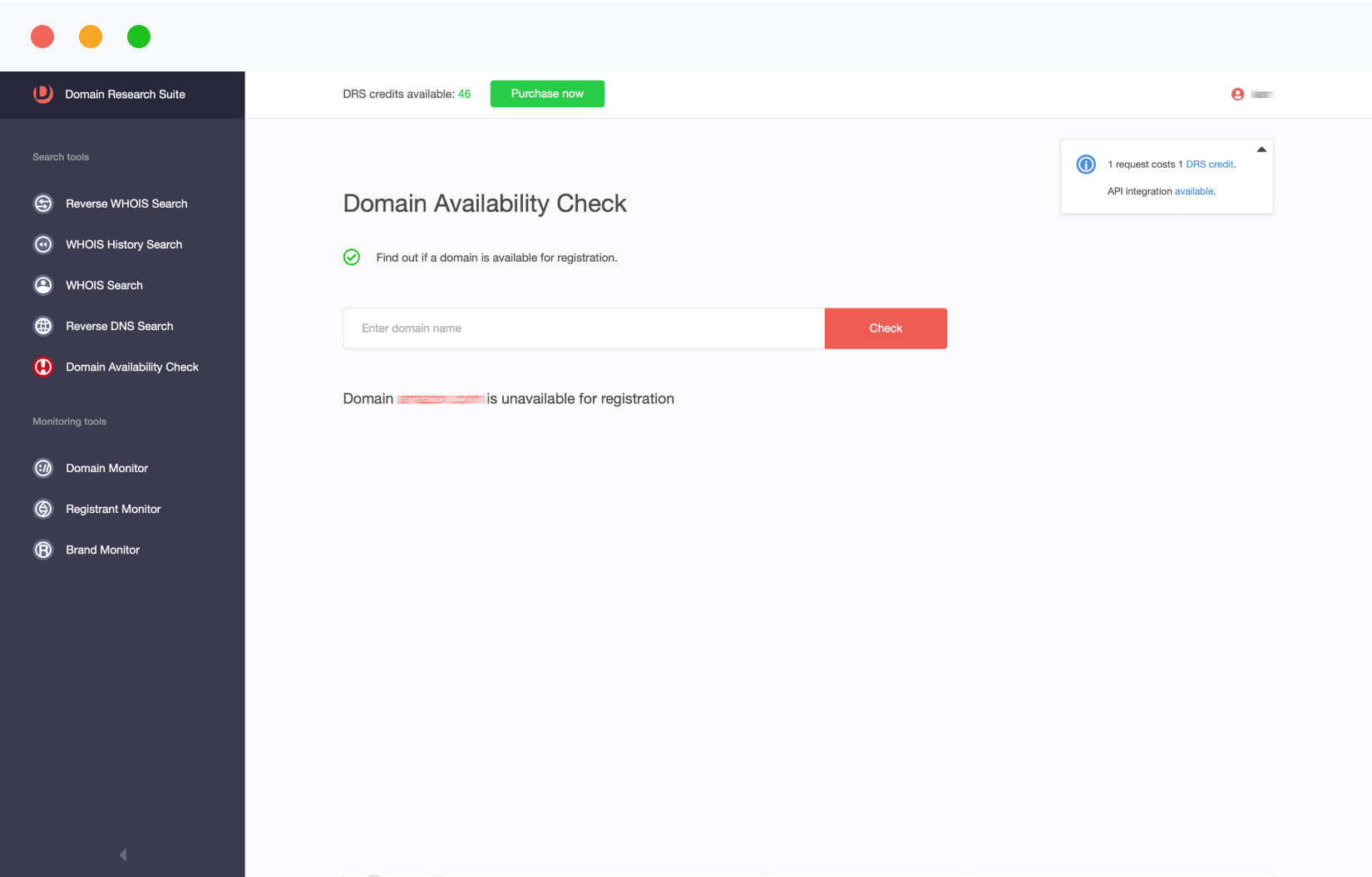
Before you spend a single dollar, the first step is to ensure your desired domain name is available. Many people assume a name is taken just because it feels like it, but domain availability varies widely. Use free tools like Namecheap’s domain search or GoDaddy’s domain checker to scan for your top choices. These tools return immediate results, letting you know if the name is available for purchase or if it’s already registered. If a name is taken, explore variations—adding numbers, hyphens, or common misspellings can sometimes secure a spot. For example, ‘fitnesscoachpro’ might be available, but ‘fitnesscoach’ could be taken, prompting you to consider alternatives like ‘fitnesscoachplus’ or ‘coachfitnesspro’.
- Instant Availability Check: Most registrars provide real-time checks to confirm if a domain is available.
- Variation Suggestions: Tools often suggest alternative names if your preferred choice is taken.
- Free Search: No cost to verify domain availability before proceeding.
2. Choose the Right Domain Extension
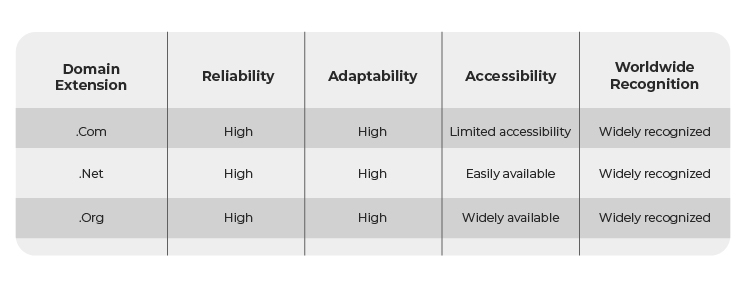
The extension (or top-level domain, TLD) you select impacts your brand’s credibility and global reach. While .com remains the most popular and trusted, newer extensions like .net, .org, or country-code TLDs (e.g., .co.uk, .io) offer niche benefits. For businesses targeting international markets, a .com or .co extension can enhance trust, while a .io (commonly used by tech startups) might appeal to a tech-savvy audience. Avoid overly generic extensions like .store or .website unless they align perfectly with your brand identity. Consider your audience’s familiarity with the extension—older users may prefer .com, while younger demographics might lean toward more modern options like .club or .app.
- Trust Factor: Com extensions are widely recognized as reliable for businesses.
- Global Reach: Country-code TLDs can target specific regions effectively.
- Brand Alignment: Choose an extension that matches your industry or audience.
3. Secure a Short and Memorable Domain

A short domain name is easier to remember, type, and spell. Ideally, aim for a name under 15 characters to avoid confusion. Longer names risk being mistyped or forgotten, which can frustrate visitors and hurt your SEO. For example, ‘bestfitnesscoaching’ is harder to recall than ‘fitnesspro.’ If your preferred short name is taken, consider abbreviations or brandable terms. Tools like DomainWheel can help brainstorm creative alternatives by analyzing word patterns and availability. Prioritize names that reflect your core value—whether it’s fitness, tech, or lifestyle—so they resonate with your audience.
- Memorability: Short names are easier to remember and share.
- SEO Benefits: Concise names improve readability and search rankings.
- Brand Consistency: Aligns with your business identity and messaging.
4. Check Trademark Conflicts

Before finalizing a domain, verify it doesn’t infringe on existing trademarks. A name like ‘AmazonFresh’ could cause legal issues if ‘Amazon’ is a registered trademark. Use the U.S. Patent and Trademark Office’s database or tools like Trademarkia to search for conflicts. Even if your name isn’t identical, avoid terms that are too similar to a well-known brand. For example, ‘GoogleAnalytics’ might conflict with Google’s trademarked name. Protecting your domain legally ensures you avoid costly disputes down the line and builds trust with customers.
- Legal Protection: Prevents trademark infringement risks.
- Brand Safety: Ensures your name isn’t too similar to a competitor’s.
- Cost Savings: Avoids expensive legal battles later.
5. Consider Domain Age and History
The age of a domain can impact its SEO and reputation. Newer domains (under 1 year old) may have weaker backlinks and lower domain authority, which can hurt search rankings. Older domains (5+ years) often have established backlinks and credibility, but they may also have outdated content or spammy links. If you find a desirable domain, check its history using tools like Moz Domain Age or Ahrefs. For startups, a newer domain might be acceptable if you’re willing to build links organically. For established brands, an older domain can be a strategic asset if it aligns with your business goals.
- SEO Impact: Newer domains may need more backlink-building.
- Reputation: Older domains often have stronger credibility.
- Flexibility: Choose based on your long-term goals.
6. Use a Reputable Domain Registrar
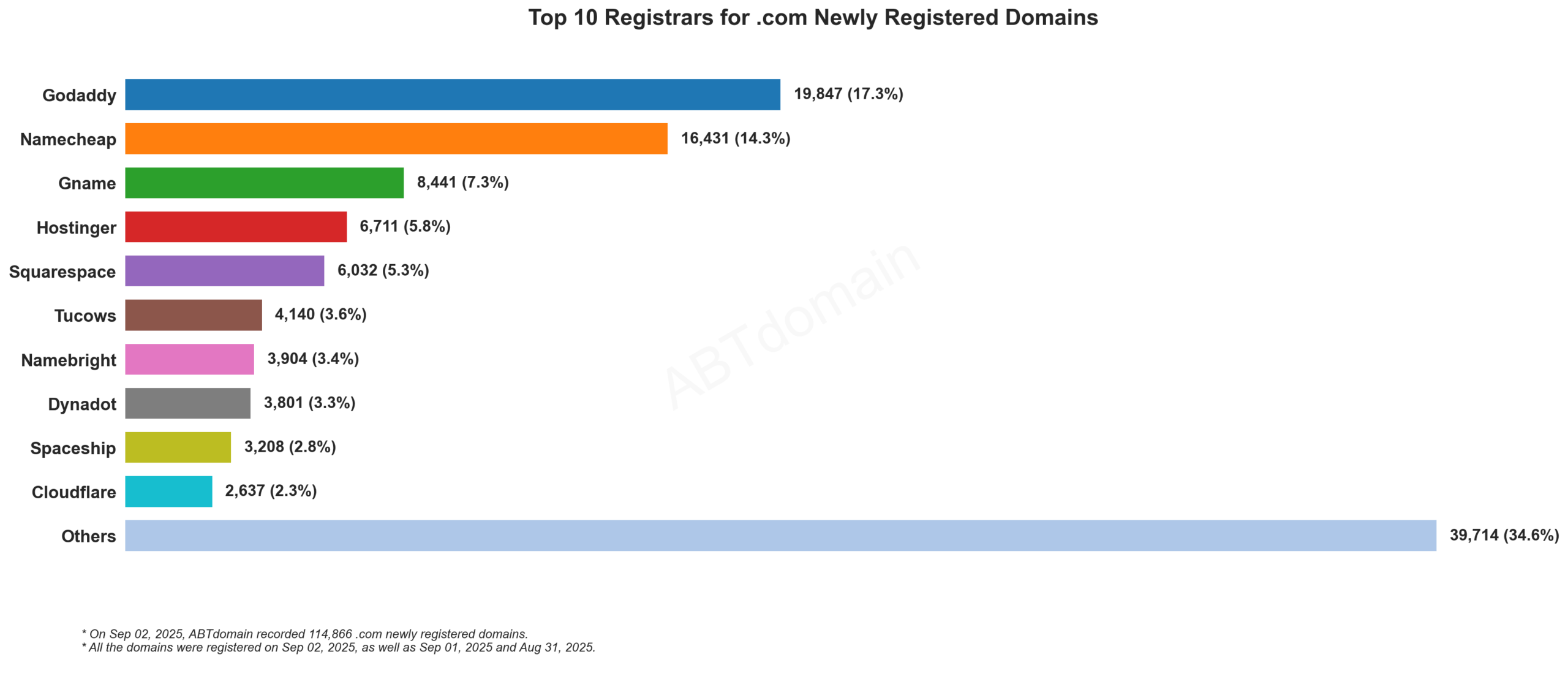
Not all domain registrars are equal. Stick with well-known providers like Namecheap, GoDaddy, or Google Domains to ensure reliable service, secure transfers, and good customer support. Avoid lesser-known registrars that may offer lower prices but lack transparency or support. Reputable registrars also provide easy domain management tools, automatic renewals, and privacy protection. For example, Namecheap is praised for its competitive pricing and user-friendly interface, while GoDaddy offers extensive business tools. Always read reviews and compare features before committing to a registrar.
- Reliability: Established registrars ensure uptime and security.
- Customer Support: Responsive help is critical for troubleshooting.
- Additional Services: Some offer DNS management and privacy protection.
7. Set Up Domain Privacy Protection
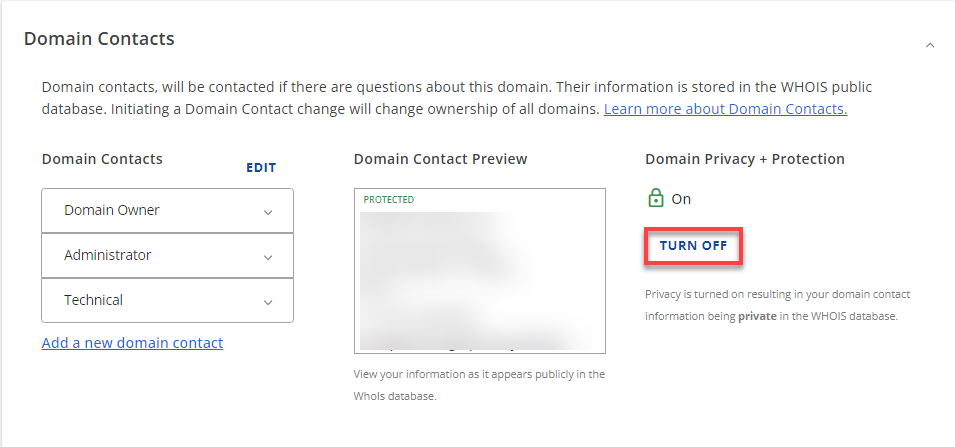
Your personal information (name, address, phone) can be exposed when you register a domain. Domain privacy protects this data by masking it behind a WHOIS lookup shield. This prevents spammers, competitors, and even potential buyers from reaching out to you directly. Most registrars offer this service for free or at a small cost. For example, Namecheap includes domain privacy by default, while GoDaddy charges an extra fee. Enabling privacy is a simple step that adds an extra layer of security and professionalism to your domain registration.
- Privacy Security: Hides your personal details from public records.
- Spam Prevention: Reduces unwanted solicitations.
- Professionalism: Shows you take your business seriously.
8. Secure Automatic Renewals
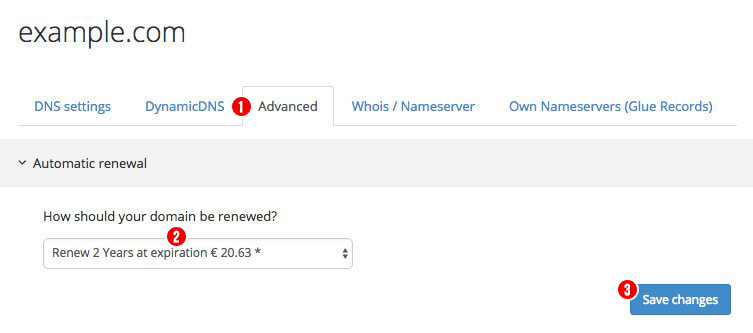
Domain expiration can disrupt your website and harm your SEO. Set up automatic renewals to avoid losing your domain to auction or transfer. Most registrars allow you to configure renewals to occur before the expiration date, often with a grace period. For example, Namecheap’s auto-renew feature ensures your domain stays active even if you forget to pay. If you’re unsure, enable reminders or set up alerts 30 days before renewal. This small step prevents costly mistakes and keeps your online presence intact.
- Avoid Expiration: Prevents domain loss due to missed payments.
- SEO Protection: Maintains your website’s ranking.
- Convenience: Automates the renewal process.
9. Explore Domain Auctions for Unique Names

If your ideal domain is taken but you’re willing to pay, consider domain auctions. Websites like Sedo or Flippa offer domains that sellers are willing to auction off. These names often include brandable terms, niche-specific keywords, or unique extensions. For example, a domain like ‘luxuryfitnessclub.io’ might be available for auction at a premium price. Auctions can be competitive, so research thoroughly and set a budget before bidding. While auctions offer rare opportunities, they’re not a replacement for finding a domain you love—only for those willing to invest in a premium name.
- Unique Names: Access to rare, brandable domains.
- Higher Prices: Potential for significant investment.
- Competitive Process: Requires careful bidding strategy.
10. Backup Your Domain Registration
Never assume your domain is safe just because you’ve paid. Create a backup of your registration details, including the registrar’s contact information, renewal dates, and any additional services like privacy protection. Store this backup in a secure, offline location or a password-protected digital file. This step is especially important if you’re using a third-party registrar or if you’re transferring domains. For example, if you switch registrars, having your backup ensures you can reclaim access to your domain quickly. A simple but critical precaution against data loss or miscommunication.
- Data Protection: Preserves critical registration details.
- Transfer Readiness: Facilitates smooth domain transfers.
- Emergency Recovery: Helps recover access if needed.
Frequently Asked Questions
How long does it take to purchase a domain?
The purchase process typically takes 1–5 minutes, depending on the registrar. Once you’ve selected a domain and checked availability, you can complete the transaction instantly. However, domain transfers or changes to ownership may take 1–7 days due to verification steps.
Can I buy a domain and immediately start building my website?
Yes, you can purchase a domain and begin planning your website right away. Many registrars offer hosting services, so you can connect your domain to a hosting account within minutes. Just ensure your domain is set up with the correct DNS records before launching your site.
What happens if I don’t renew my domain on time?
If you don’t renew your domain, it enters a grace period (usually 5–10 days) where you can still pay to keep it. After the grace period, your domain may be auctioned off or transferred to another owner. To avoid this, set up automatic renewals or reminders well in advance.
Is it better to buy a domain through a registrar or a marketplace?
Buying through a registrar like Namecheap or GoDaddy is often better because they offer direct ownership, better support, and more control over your domain. Marketplaces like Sedo or Flippa can be useful for finding unique domains but may come with higher fees or less transparency.
How do I check if a domain name is already in use?
Use free tools like Namecheap’s domain search or GoDaddy’s domain checker. These tools provide real-time results and often suggest alternative names if your preferred choice is taken. Avoid guessing—verify before committing.
What should I do if I find a domain I love but it’s taken?
If the domain is taken, explore variations (adding numbers, hyphens, or misspellings) or check domain auctions like Sedo for a premium option. If you’re serious about the name, consider reaching out to the owner to negotiate a purchase directly.
How much does it cost to purchase a domain?
Domain prices vary widely. Basic .com domains typically cost $9.99–$14.99 per year, while premium domains or those with unique extensions can cost $100 or more. Auction domains may exceed $500,000 depending on the name’s value.

